v0.8.1 ·
Check where the holes go
Thanks to Santiago Ariza (@santiariza15) for contributing the PCB enclosure recipe and the checks for hole positions and material clearances.
Four holes of the right diameter can still be in the wrong places. Your agent can now check their positions, measure whether a connector has room, and confirm that material remains where a support needs it.
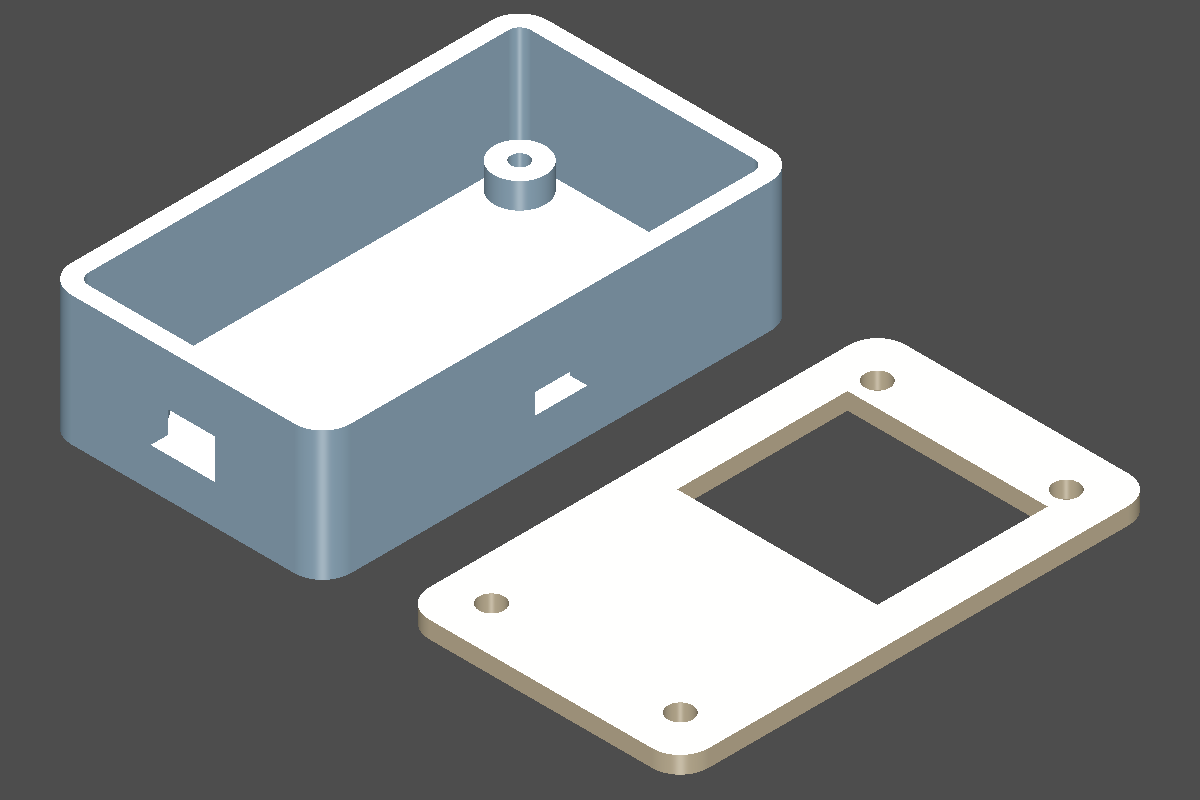
There is also a complete PCB enclosure to copy and adapt: a tray with board supports and connector openings, plus a screw-on lid. This is the actual example, with the parts separated so you can see inside.
Check the position, not just the count
A spec can list the expected cylinder centers and diameters, then match them one by one against the saved STEP file. That catches a mounting pattern that has the right number of holes but will not line up with the board. The measurement identifies cylinder axes; it does not establish hole depth or which side contains material.
Box-shaped probes can also check for a maximum amount of material in a keepout, or a minimum amount in a support. Overlapping solids count once. A failed measurement is reported as unavailable, so the agent cannot mistake missing evidence for a passing check. Probes measure volume inside the box, rather than minimum clearance or wall thickness. These checks are available in standalone specs; retained requirements remain an experimental workflow.
Start with a working enclosure recipe
Copy the whole recipe directory, then change the board dimensions, hole locations, openings, and clearances for your design. The helpers and JSON board description belong to the example, so your agent can edit them directly. Discover it with agentcad docs recipes.
The included checks establish specific geometry. Board fit, screw selection, manufacturing tolerances, and antenna performance still need validation for your hardware.
Keep working in the project you already have
If an agent accidentally supplies the wrong build directory, the recovery guidance first points it back to the existing project. It can read that project’s context and retry the command without the mistaken override. It no longer gets pushed toward initializing a second project when a valid one is already there.
Get saved cloud models out in more formats
Export a saved cloud version to STL, OBJ, or GLB, then download the result after checking its mesh validation. This needs matching export support on your host.
For a GLB that retains authored part IDs and colors, request it during the cloud build with --export glb. A later whole-model export does not preserve those part identities. A failed GLB export leaves a successful STEP build available.
Choose what feedback leaves your machine
Feedback starts locally. A human can enable brief automatic observations in the live viewer and revoke sharing at any time. That choice is specific to the build root and recipient. Agents cannot enable it themselves. Automatic observations contain only the brief message and AgentCAD version.
Longer reports stay local unless you request a one-off upload. Diagnostics are separate: prepare the complete payload locally, review and redact it, then explicitly send that reviewed JSON. Command logs and environment details are never attached to brief observations automatically. The local MCP feedback tool follows the same rules.
Recognize both versions by their colors
Automatic comparison images now restore the saved part colors on the previous model as well as the current one. If the saved parts cannot be matched completely and unambiguously to the STEP file, the full previous model stays visible in neutral colors with a warning. Historical scripts are not rerun to recover appearances.
Release checks
The daemon heartbeat regression now allows realistic scheduling jitter while still detecting a command that runs past its total deadline. This fixes an unreliable test without changing the deadline behavior in the released tool. Python 3.10 can also run the skill generator and collect the test suite again; those paths now use the compatible TOML reader.
Upgrade
Stop running services with your existing installation, then upgrade:
agentcad daemon stop
agentcad viewer stop
python -m pip install --upgrade "agentcad==0.8.1"
For MCP support, install agentcad[mcp]==0.8.1. Restart MCP clients and refresh project guides with agentcad instructions install and agentcad skill install.